Fighting fake reviews is a constant battle for Google’s spam detection system.
Whether they’re negative reviews left by a competitor, or overly generous fake positive reviews that may have been left by someone affiliated with the business, Google has spam detection systems in place to cut down on fake reviews.
Over the last few months, we’ve noticed increasing chatter on online message boards and on LinkedIn about people receiving email notices saying that fake or incentivised reviews have been found on their Google Business Profile. Up until this week, however, it’s been something that has flown largely under the radar for us, as none of our clients had been affected.
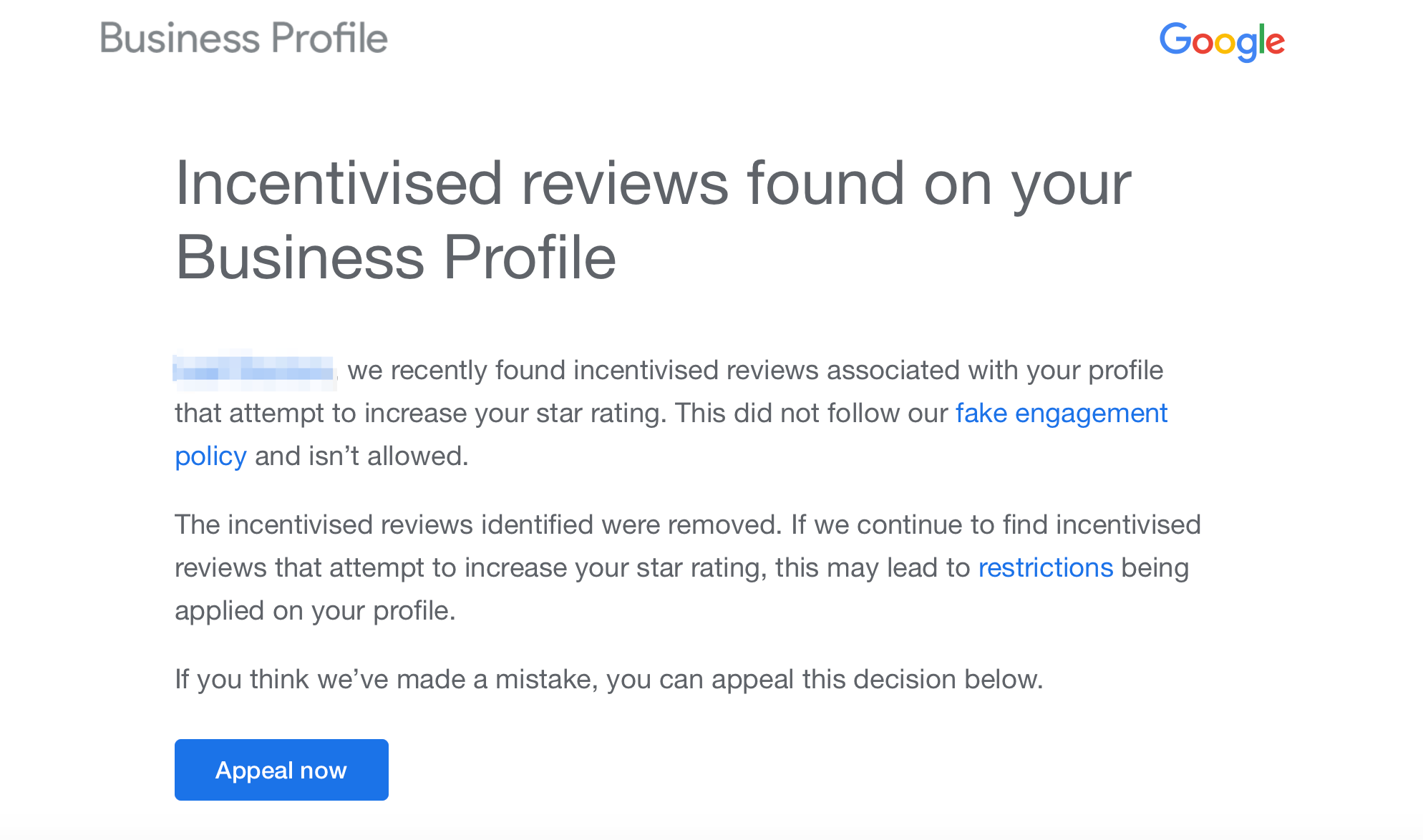
This week, one of our clients received the “fake or incentivised reviews found on your Business Profile” email from Google, which has forced us to do more digging to understand what’s happening and how you can possibly prevent it.
What is a fake or incentivised review?
According to Google’s contribution policy glossary, incentivised or biased reviews are reviews influenced by one of the following things:
Payment
Discount
Free goods or services
Any other benefit offered to the reviewer
A biased review is any review that’s left by a person or professional with a conflict of interest. In most cases, that refers to a member of staff, family or friends, or anyone else who has a vested interest in the reviews they leave for a profile.
Incentivised and biased reviews undermine Google’s review system, and therefore tackling them and implementing detection systems is one of the key ways that Google works to maintain the integrity of Google reviews.
Why did I get the fake or incentivised reviews email notification from Google?
If you’ve received the fake or incentivised reviews email notification from Google, it means that Google’s spam detection systems have found reviews on your profile that have been flagged as incentivised or biased.
By the time you get the email, Google will have already removed the incentivised reviews from your profile. They’ll also have put a warning in place that if this pattern continues, you risk restrictions being placed on your profile, which could mean that users can no longer leave reviews on your profile for a set period of time, and you’re unable to edit your Google Business Profile.
Google does provide an opportunity to appeal the decision using the Appeal Now button. However, the difficulty is that you need to know which review caused the flagging, or which review triggered the email to be sent. If you’ve got a Google Business Profile with a low number of reviews, that may be fairly simple, but otherwise it may be easier said than done.
Let’s take two scenarios:
Scenario 1
You have 10 reviews on your profile. A week ago, you received your first review in six months, and now you’ve received the “incentivised reviews found on your Business Profile” email. In this case, it’s fairly easy to track what caused Google to issue this email.
Scenario 2
You’re a popular business that receives tens or hundreds of reviews each week, and you’ve received this email. In this case, it’s going to be very difficult to pinpoint which reviews actually caused the email to be sent, unless you were aware of a pattern of incentivised reviews being left on your profile. Let’s say a review recently mentioned, “This business gave me an X% discount for leaving this review, but I’m happy to do it anyway because I had a great service.” Then it’s very easy to track what’s happened.
In this case, our client who received the email falls into scenario two. They’re a high-volume online retailer that receives 10 to 20 reviews each and every day. None of their reviews stood out as including anything that would potentially trigger the email to be sent.
They don’t engage in any unscrupulous review collection tactics and don’t incentivise reviews, so there was nothing they were able to pinpoint that could have been the catalyst for receiving the email.
Therefore, we’re advising them not to appeal the decision, rather than going through the appeals process and potentially putting forward a case around a review that didn’t cause the email to be sent.
Can you appeal Google’s decision?
Yes, Google gives you the option to appeal the decision directly from the email. The Appeal Now button will take you directly to the portal to start the appeal, where you can make your case to Google.
If you have any supporting documentation, such as an SMS where a client has sent you a message saying, “Hey, I just left you a review because I was so happy with your service,” or similar, then it would obviously be beneficial to include that in your appeal. Any supporting documentation can help Google potentially overturn their decision, reinstate the review or reviews that have been affected, and lift any potential restrictions on the profile.
Is it worth appealing if you’re not sure which review caused the email?
If you’re not sure why you received the email, because you receive a high quantity of reviews and there are no reviews that stand out as having been the reason you received it, then it’s likely not worth appealing.
Of course, that’s just our two cents, but to us, if you’re going to Google, you want to have a rock-solid case for why the review should stand and why they’ve made a mistake in issuing the email. The last thing you want to do is state your case and make an argument based on a review that wasn’t the reason behind getting the email in the first place.